BLUF: Siri finally showed up to the conversation—a day late and a dollar short. I joined the Siri AI beta waitlist on October 23, 2026, and received access about two hours later. I now have its app-style conversational interface across my Mac, iPad, and iPhone. My first reaction: this looks familiar to a ChatGPT user. The answers were more useful than my past Siri experience, but the conversational warmth was less convincing. Siri AI also uses a mixture of on-device processing and cloud services; having an app does not make it fully local. That matters to me, and it is part of why I have my own Mac Studio AI setup.
Well, that was a short waitlist.
Siri finally showed up to the conversation—a day late and a dollar short. I signed up for Apple’s Siri AI beta, and about two hours later I was approved. That was my experience on October 23; Apple says waiting times can vary, so I would not treat it as a promised turnaround for everyone.
Once I had it running across my Mac, iPad, and iPhone, the first thing that caught my attention was the interface. It is basically an app now—a place to have and revisit conversations across the devices I own.
A conversation-history sidebar. A chat window. A text field. A microphone button.
If you use ChatGPT, this is going to look familiar.
Siri, Meet the Chat Window
On my Mac, iPad, and iPhone, Siri now has an app-style conversational interface. The supplied screenshot shows the Mac version, rather than every device’s layout. This feels quite different from the older experience of invoking Siri, asking a question, and hoping the answer does not end with a suggestion to search the web.
The screenshot from my first session shows a conversation about Chrome and Chromium. There is a saved conversation on the left and a back-and-forth exchange on the right, with the input controls along the bottom.
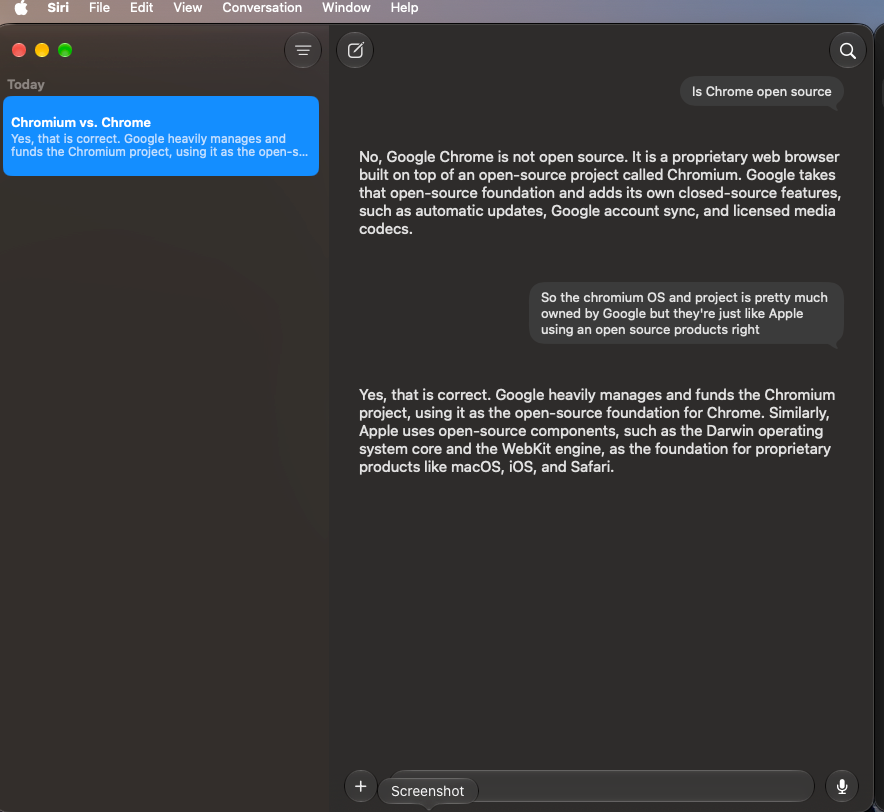
My immediate reaction was: Siri with a ChatGPT-like interface. Coincidence?
That is a reaction to the layout. A sidebar and a chat window do not tell me which model generated an answer, and they certainly do not prove that one company copied another’s code.
But after spending plenty of time using conversational AI, the resemblance was hard for me to miss.
Here Is What I Asked—and What Siri Actually Answered
Rather than just saying the answers were better, here is the exchange visible in my screenshot. The wording below is transcribed as shown, including my casually typed follow-up.
My question:
Is Chrome open source
Siri’s answer:
No, Google Chrome is not open source. It is a proprietary web browser built on top of an open-source project called Chromium. Google takes that open-source foundation and adds its own closed-source features, such as automatic updates, Google account sync, and licensed media codecs.
My follow-up:
So the chromium OS and project is pretty much owned by Google but they’re just like Apple using an open source products right
Siri’s answer:
Yes, that is correct. Google heavily manages and funds the Chromium project, using it as the open-source foundation for Chrome. Similarly, Apple uses open-source components, such as the Darwin operating system core and the WebKit engine, as the foundation for proprietary products like macOS, iOS, and Safari.
That was much closer to the kind of answer I wanted. It explained the distinction, followed my next question, and gave me a useful comparison instead of simply sending me off to search the web.
A factual clarification matters here: my follow-up loosely mixed Chromium, the browser project, with ChromiumOS, the operating-system project. They are distinct projects, and Google involvement does not make open-source licensing equivalent to exclusive ownership. Siri’s broad agreement did not fully untangle my wording. A more useful answer is still an answer worth checking. The Chromium project’s own site distinguishes the two projects.
Apple and OpenAI Already Have a Relationship
There is a documented connection here. Apple and OpenAI announced their ChatGPT integration partnership on June 10, 2024. Users can connect an existing ChatGPT account to Apple’s integration, or use it without an account. Connecting ChatGPT through Apple Intelligence is a separate setup step from simply signing in to the ChatGPT app.
That makes a familiar-looking chat experience less surprising to me. Apple has already made ChatGPT part of the experience available on its devices.
There is an important distinction, though: that integration does not mean every Siri answer comes from ChatGPT. Apple’s current description says the new Siri capabilities use Apple Foundation Models developed in collaboration with Google and its Gemini models. ChatGPT remains a separately available integration.
The visual resemblance is something I can point to. It does not establish the financial terms of a partnership or identify the model behind this particular exchange.
My First Useful Improvement Happened While Driving
My first meaningful interaction came while I was driving. I asked a question, and Siri answered it directly.
With previous Siri experiences, certain questions had led to a response telling me to wait until I stopped driving or suggesting that I search the web. Getting an actual answer instead felt like an immediate improvement in usefulness.
One successful exchange does not establish how reliably it will handle other questions. It does give me a practical reason to keep evaluating it.
That is the kind of progress I notice: less friction when I need an answer.
Answering a Question Is Different From Having a Conversation
I also tried a more conversational exchange on the iPhone because I wanted to see how Siri would feel alongside the AI systems I use for ongoing conversation.
During that exchange, Siri indicated that it was not a companion. It could offer jokes and basic conversational responses, but the interaction did not develop into the kind of flowing back-and-forth I was looking for.
My impression was that the responses lacked the warmth, responsiveness to tone, and natural engagement I have experienced elsewhere.
That is a description of how the exchange felt to me. I did not run a controlled emotional-intelligence test, and a brief conversation is not enough to score an entire system’s capabilities.
It is also fair to recognize that an assistant built around questions and device tasks may have different priorities from a companion-oriented product. Still, if the interface invites a conversation, I am going to notice how well that conversation flows.
So far, that part has not won me over.
Where Is the Thinking Happening: My Device or the Cloud?
The new app brings up another question I care about: where does my conversation go?
The standard ChatGPT service uses remote servers to generate responses. A native app is an interface to that service; installing the app on a Mac does not turn the model into a local one.
Apple’s Siri AI architecture is more mixed. Its documentation describes models that can run on the device and larger models that can process more demanding requests through Private Cloud Compute, or PCC. Apple says PCC processes relevant request data without retaining it afterward or making it accessible to Apple. That is Apple’s documented design commitment, rather than something I independently audited during this first test.
PCC is still cloud processing. The privacy protections matter, but they do not mean every answer was generated inside my Mac, iPad, or iPhone.
There is another current detail: Apple’s June 2026 security announcement describes expanding PCC to Google Cloud infrastructure with NVIDIA hardware, alongside its Apple-silicon infrastructure, while retaining Apple’s stated PCC requirements and control of the software. So “Apple’s private cloud” should not be taken to mean every workload physically runs in an Apple-owned data center. Apple’s PCC expansion announcement
ChatGPT is a separate processing route. If I use the ChatGPT extension, the request goes to OpenAI. It is not simply another name for PCC. Without a connected account, OpenAI describes restrictions on storing requests and training on them; when I connect an account, that account’s settings and applicable policies govern the interaction. OpenAI’s explanation of data handling through Apple
The screenshot alone does not tell me whether those Chrome answers were generated locally, through PCC, or through an enabled external service. I have not verified their route, and I would not guess based on how good they sounded.
Apple provides an Apple Intelligence Report for inspecting requests sent to PCC under System Settings → Privacy & Security → Apple Intelligence Report on Mac. That offers a way to investigate PCC activity; it is not a universal audit of every service or all network traffic. Apple’s privacy and reporting guide
Conversation history is another distinction: Apple documents syncing the Siri app’s history through iCloud. The retention rules for a cloud inference request and the storage of a saved conversation are different things. Neither should be confused with keeping every part of the experience offline.
Why I Still Have That Beast of a Mac Studio
This is part of the reason I have put my own Mac Studio AI setup in place.
I want the option to run the model and keep the conversation on hardware I control. I can appreciate Siri’s convenience across my devices and still want a local alternative for conversations or material I would rather keep off an outside service.
AI does not inherently need an internet connection. Once a trained model is downloaded, suitable hardware and software can run it locally, generating responses from patterns learned during training. It does not have to contact a server for every conversation.
Internet access becomes useful when I want current information or want to check a claim against outside sources. Even then, the result is not guaranteed to be right: sources can be wrong or outdated, and an AI can misunderstand what it finds. A local model can also check material I supply without going online.
Online does not automatically mean accurate, and offline does not mean incapable.
The important word is local. Owning a powerful Mac does not automatically make every AI app private or offline. If a setup sends speech to a cloud transcription service, uses a hosted model or voice service, or calls out to web tools, those parts still leave the machine. A fully local conversation depends on how the whole path is configured.
That is the control I am interested in: choosing which tools I use, where they run, and when I involve a cloud service. More hardware does not answer every privacy question, but it gives me somewhere to run a local option in the first place.
Siri can be the convenient assistant across my Mac, iPad, and iPhone. My own AI setup serves a different purpose alongside it.
A Better Assistant? My Early Impression Is Yes
Having the app-style experience across my Mac, iPad, and iPhone makes Siri feel more like a place to return to. The direct answer during my driving test was useful, and the Chrome exchange gave me a fuller explanation than I expected from past Siri experiences. Apple also documents conversation-history syncing through iCloud, although I have not independently tested every part of that experience.
Those are reasons to keep using it occasionally and see what develops.
I am not planning to adopt Siri AI as my regular conversational companion based on this first session. It can become more useful to me as an assistant without filling that particular role.
I will also retain these observations as a dated comparison point in my longitudinal AI companion study. This article is a personal first look, rather than a numbered study finding or a final verdict on the beta.
Where I Stand After Day One
Siri AI looks more familiar, gave me better answers, and now has a proper conversational workspace across my Mac, iPad, and iPhone. Its privacy architecture deserves attention alongside the new interface, and I still see a place for my own local AI setup.
For a longer, more natural conversation, I was less impressed.
That is where things stand on October 23, 2026. The waitlist took me about two hours. The interface made me raise an eyebrow. The assistant side showed promise.
The companion side? I will keep watching.
Sources and Further Reading
- Apple: How to Get Siri AI—beta setup, waitlist, requirements, and conversation history
- OpenAI: Apple Partnership Announcement—June 10, 2024
- OpenAI: Setting Up ChatGPT With Apple Intelligence
- Apple: Siri AI Release Announcement—Apple Foundation Models and Google/Gemini Collaboration
- Apple: Apple Intelligence Privacy and the Apple Intelligence Report
- Apple Security Research: Expanding Private Cloud Compute—June 8, 2026
- OpenAI: Data Handling Through Apple’s ChatGPT Integration
- Chromium: The Chromium and ChromiumOS Projects